Skip to content
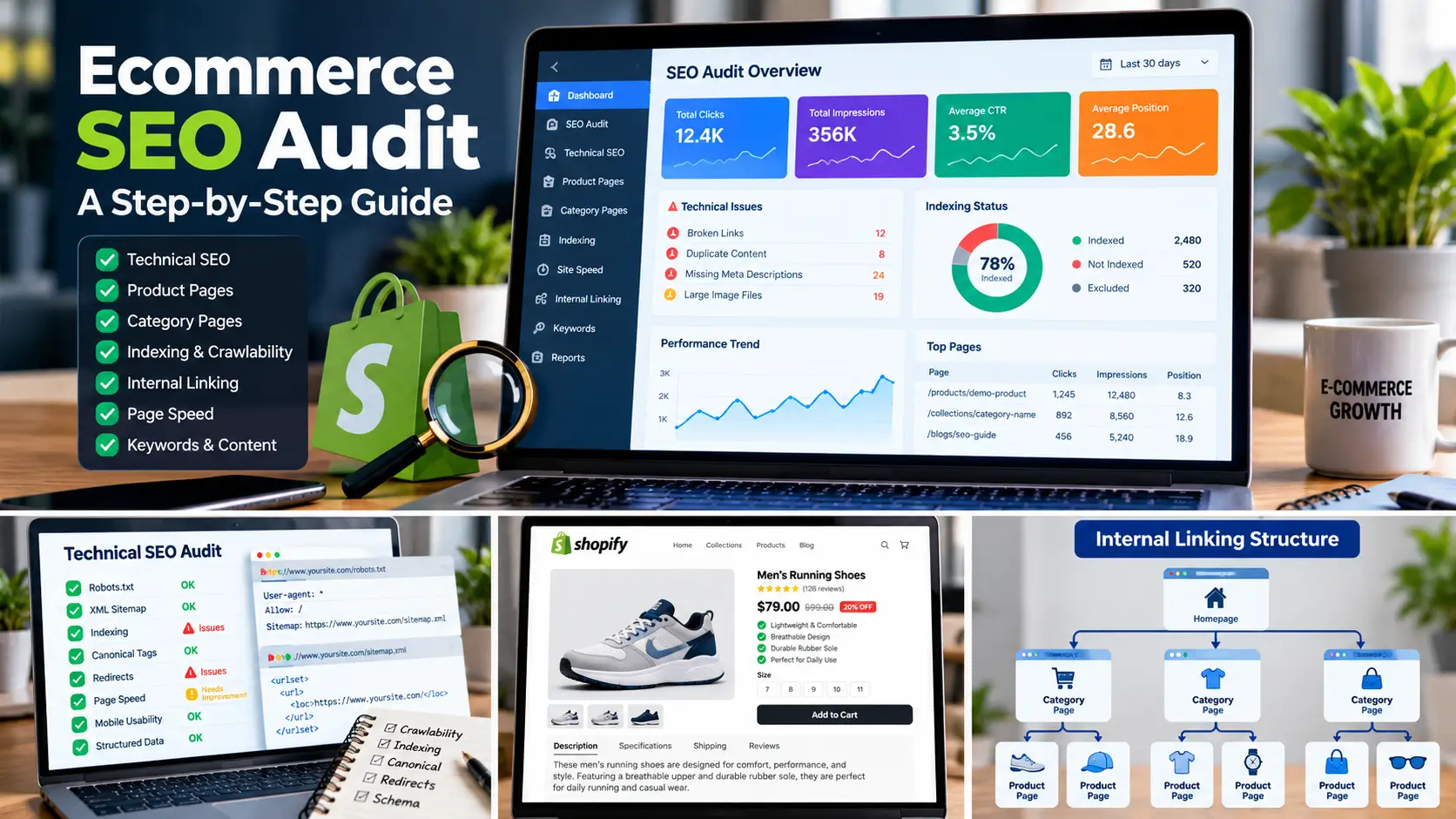
An ecommerce website can have thousands of product pages, multiple categories, filters, and complex navigation. While these features help shoppers find products, they can also create SEO challenges when the website is not structured correctly.
Important product pages may remain unindexed, category pages may target overlapping keywords, and broken links or slow-loading pages can create a poor user experience.
An ecommerce SEO audit helps identify these issues and organize improvements according to their potential impact.
In this guide, you will learn how to audit an ecommerce website step by step, evaluate technical SEO, review product and category pages, analyze internal linking, and create a practical action plan.
1. Check Website Indexing
Start by reviewing whether search engines can discover and index your important pages.
For an ecommerce store, these may include:
- Homepage
- Main category and collection pages
- Important product pages
- Supporting buying guides
- Other valuable landing pages
Open Google Search Console and review the Page indexing report. Use URL Inspection to investigate important URLs individually.
Look for pages that are not indexed and investigate the reported reasons. A page may be excluded because of a noindex directive, a canonical pointing elsewhere, a redirect, or another technical issue.
Do not assume every excluded URL is a problem. Filtered URLs, duplicate pages, and certain utility pages may not need to appear in Google.
Action tip: Create a list of commercially important URLs and confirm that each one is accessible, indexable where appropriate, and internally linked.
2. Review Crawlability and Technical SEO
Search engines need to discover and crawl important content efficiently.
Review the following elements:
Robots.txt: Check whether important product, category, or content pages are unintentionally blocked.
XML sitemap: Confirm that the sitemap is accessible and includes the appropriate canonical URLs.
Canonical tags: Review duplicate URL variations and verify that canonical tags point to the intended preferred page.
Redirects: Identify redirect chains, redirect loops, and outdated URLs that no longer lead to useful destinations.
HTTP status codes: Find important pages returning errors such as 404 or server errors.
Mobile usability: Test whether users can navigate the website and interact with important page elements on mobile devices.
Use a crawler such as Screaming Frog alongside Google Search Console when appropriate. Validate issues before making changes, because not every warning requires a fix.
3. Audit Product Pages
Product pages are important because they help customers evaluate and purchase products.
Review a representative sample of products, then expand the audit if you discover recurring problems.
Check whether each important product page has:
- A descriptive SEO title
- A useful meta description
- A clear main heading
- Accurate, helpful product descriptions
- Relevant specifications and benefits
- Optimized product images and alt text
- Appropriate internal links
- Accurate pricing and availability information
Look for generic descriptions, missing information, duplicated content, and pages that do not adequately answer customer questions.
Prioritize products with business value and search demand instead of treating every URL as equally important.
4. Audit Category and Collection Pages
Category pages help shoppers browse related products and often target commercially valuable search terms.
Check whether each important category has a clear purpose and targets a distinct search intent.
Review:
- Category names and headings
- SEO titles and meta descriptions
- Introductory content where useful
- Product listings and navigation
- Internal links to subcategories and products
- Duplicate or overlapping category pages
- Pagination and filtered URL behavior
For example, an outdoor retailer might have separate categories for hiking backpacks, camping tents, and sleeping bags.
Each page should help users find relevant products without creating unnecessary duplication or confusion.
5. Analyze Keyword Targeting and Search Intent
An ecommerce SEO audit should examine whether important pages target relevant search queries.
Use Google Search Console to compare queries, impressions, clicks, and average positions for individual URLs.
Look for potential issues such as:
- Product pages appearing for irrelevant searches
- Several pages targeting the same search intent
- Important categories receiving few impressions
- High-impression pages receiving few clicks
- Valuable products with little organic visibility
Review the actual search results and page content before changing keyword targeting.
A low click-through rate does not automatically mean the title is poor, and a low ranking does not automatically mean the page needs more text. Competition, intent, relevance, and technical factors may all contribute.
6. Check Internal Linking and Website Architecture
Internal linking helps users navigate the store and helps search engines discover related pages.
Review whether important products and categories can be reached through sensible navigation and contextual links.
Look for:
- Important pages with few internal links
- Broken internal links
- Orphaned pages that cannot be reached through normal internal navigation
- Excessively deep page structures
- Irrelevant or repetitive anchor text
- Useful opportunities to connect related content
For example, a buying guide can link to the relevant product category, while a category page can link to its important products.
Use descriptive anchor text naturally and make sure each link provides value to the reader.
7. Find Broken Links and Redirect Problems
Broken links can interrupt the customer journey and waste opportunities to guide visitors to relevant content.
Use a website crawler to identify internal links that lead to 404 pages, server errors, or unexpected destinations.
For each issue:
- Confirm the source link and destination.
- Check whether the destination should exist.
- Update the link if a suitable replacement is available.
- Add a relevant redirect when a URL has permanently moved.
- Avoid redirecting unrelated pages to the homepage simply to eliminate errors.
Review external links separately. Fix those that matter to users or support important content.
8. Evaluate Page Speed and Core Web Vitals
Page performance can influence user experience, especially on mobile devices.
Use Google PageSpeed Insights to test representative templates such as the homepage, product pages, and category pages.
Review the available performance data, including Core Web Vitals where field data exists.
Potential improvements include:
- Compressing oversized images
- Reducing unnecessary JavaScript
- Reviewing third-party apps and tracking scripts
- Avoiding excessive page animations
- Improving layout stability
- Ensuring pages respond properly on mobile
Do not remove useful store features without testing their effect. Prioritize changes that improve the actual customer experience and measure results after implementation.
9. Review Ecommerce Image SEO
Product images can help shoppers understand products and support image search visibility.
Check whether important images:
- Load correctly
- Use appropriate dimensions and file sizes
- Have descriptive alt text when meaningful
- Use suitable modern formats where practical
- Avoid unnecessary duplication
- Appear clearly on mobile devices
Alt text should describe the image accurately. For example, a product image could use “Brown leather laptop backpack with padded shoulder straps” if that description matches the image.
Avoid stuffing alt text with keywords that do not describe what users see.
10. Validate Structured Data
Structured data can help search engines understand products and other page information.
Depending on the website and platform, review appropriate Product structured data and other relevant markup.
Check for:
- Accurate product names
- Correct price and currency
- Availability that matches the page
- Valid image references
- Appropriate review information where supported
- Errors or conflicting markup
Use Google’s Rich Results Test and relevant Search Console reports to investigate issues.
Do not invent ratings, reviews, or product details. Valid markup makes a page eligible for certain search features but does not guarantee that those features will appear.
11. Review Content Quality and Duplicate Pages
Ecommerce websites can accumulate similar product descriptions, thin category pages, outdated guides, and multiple URLs that serve the same purpose.
Review content based on its usefulness, accuracy, search intent, and business value.
Consider:
- Improving descriptions that lack important product information
- Updating outdated buying guides
- Combining genuinely overlapping content where appropriate
- Improving category content when it helps shoppers
- Reviewing canonicalization for duplicate URL variations
- Removing or redirecting obsolete pages when appropriate
Do not add content simply to reach a target word count. Focus on information that helps customers choose products and understand their options.
12. Create a Prioritized SEO Action Plan
An audit is only useful when its findings lead to clear actions.
Organize issues according to their severity, the pages affected, and their potential business impact.
A practical prioritization framework is:
High priority: Important pages accidentally blocked from indexing, broken purchase journeys, server errors, or incorrect canonical tags affecting key URLs.
Medium priority: Missing titles, weak product descriptions, broken internal links, and navigation problems affecting valuable pages.
Lower priority: Minor wording improvements or small issues with limited impact on users and search visibility.
This is a general framework. Actual priorities should depend on evidence from the website, not only the issue category.
For each finding, record the affected URLs, evidence, recommended fix, responsible person, and status.
Ecommerce SEO Audit Checklist
Use this checklist when reviewing an online store:
-
Check important URLs in Google Search Console.
-
Review indexing and crawlability.
-
Verify the sitemap and robots directives.
-
Check canonical tags and redirects.
-
Identify broken links and server errors.
-
Audit product titles and descriptions.
-
Review category and collection pages.
-
Analyze search queries and keyword targeting.
-
Evaluate internal links and site architecture.
-
Test page performance and mobile usability.
-
Review image optimization and alt text.
-
Validate appropriate structured data.
-
Check duplicate and outdated content.
-
Create a prioritized implementation plan.
When Should You Request a Professional Ecommerce SEO Audit?
A professional audit may be useful if your ecommerce website has declining organic traffic, important pages that are not indexed, technical problems, or unclear keyword targeting.
It can also help when a store has grown significantly and its navigation, product catalog, or URL structure has become difficult to manage.
A useful audit should identify verifiable issues, explain their potential impact, and provide a clear plan for fixing them. It should not promise rankings or traffic increases without evidence.
If you need help identifying SEO issues and opportunities, explore my Ecommerce SEO Services or Shopify SEO Services.
You can also request a Free Ecommerce SEO Audit to discuss your website’s current SEO challenges.
Frequently Asked Questions
What is an ecommerce SEO audit?
An ecommerce SEO audit is a structured review of a store’s technical setup, indexability, product pages, category pages, internal links, content, and search performance. Its purpose is to identify issues and prioritize practical improvements.
How often should an ecommerce website be audited?
The appropriate frequency depends on the size and complexity of the store. Review Search Console and important technical reports regularly, and conduct a deeper audit after major platform, theme, URL, or site structure changes.
Which tools can help with an ecommerce SEO audit?
Google Search Console, Google Analytics, Google PageSpeed Insights, Screaming Frog, and other SEO platforms can help investigate different aspects of an audit. Choose tools according to the website’s size, needs, and available data.
Does an SEO audit guarantee higher rankings?
No. An audit identifies potential problems and opportunities, but rankings depend on many factors, including relevance, competition, website quality, and search engine systems. Results cannot be guaranteed.
What should be fixed first after an audit?
Start with verified issues that affect important pages or prevent customers and search engines from accessing key content. Then address page optimization, internal linking, performance, and content improvements according to their likely impact.
Final Thoughts
A successful ecommerce SEO audit goes beyond collecting warnings from SEO tools. It examines how search engines discover the store, how well pages satisfy search intent, and whether customers can navigate the website effectively.
Start with important URLs, verify each issue, and prioritize changes according to evidence and business impact.
If you want support reviewing your store’s SEO, explore my ecommerce SEO services or request a free ecommerce SEO audit.